
DN-300 Series Hardware Manual
The DN-300 Series is a family of ultra-compact DisplayNet Transmitters / Receivers used in DisplayNet systems. These devices are designed to support SDVoE's routing of AV signals over a 10GbE network with enhanced features including mode switching, PoE+ support, and H.264/H.265 streaming capabilities.
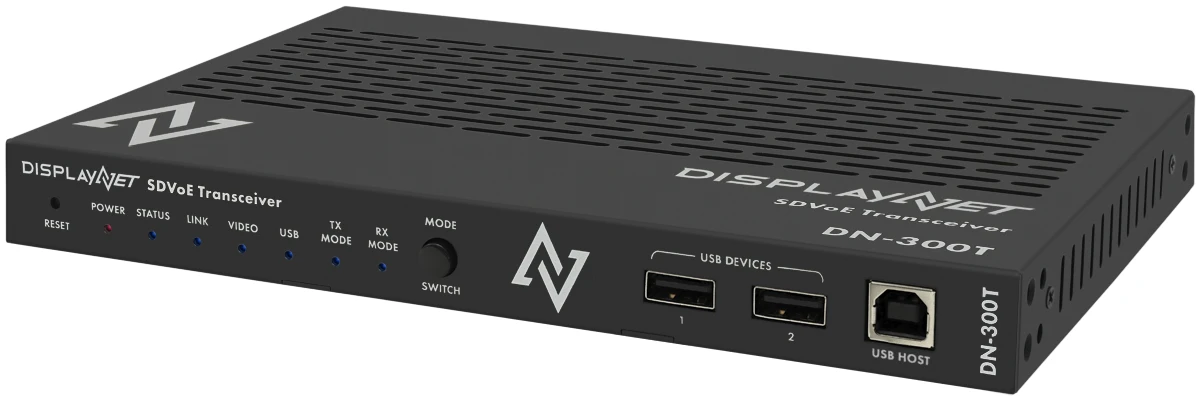
DN-300 Series Models
DN-300H (DisplayNet SDVoE Transmitter/Receiver USB HID)
The DN-300H provides single direction operation (TX or RX mode) with specialized USB HID support for instant switching of Human Interface Devices. This model is optimized for cost-effective KVM applications requiring software features with reduced hardware complexity.
DN-300T (DisplayNet SDVoE Transceiver)
The DN-300T provides bidirectional simultaneous TX and RX operation with full USB 2.0 routing capabilities. This model supports virtual hub functionality and complete transceiver operations for AV distribution applications requiring simultaneous encoding and decoding.
Key Features
Ultra-Compact Design
- Height: 21.6 mm (0.85 inches) - 38% height reduction from previous generation
- Weight: 0.69 kg (1.53 lbs) - 54% weight reduction from previous generation
- High-Density Mounting: Up to 4 devices per 1U rack space
Operating Mode Flexibility
- DN-300H: TX/RX mode switching via front panel button
- DN-300T: TX/RX/TRX mode switching for simultaneous bidirectional operation
- Mode Retention: Configuration saved through power cycles
- Remote Control: Mode switching via DisplayNet Manager® or API
Power Options
- External Power: 12VDC adapter with locking connector
- PoE+ Support: IEEE 802.3at power delivery over 10GbE copper
- Power Redundancy: Both methods can be used simultaneously
- Low Power: 13.5W typical, 30W maximum consumption
Advanced Video Processing
- H.264/H.265 Streaming: Primary (1080/30p) and secondary (540/30p) streams
- MultiViewer Engine: Up to 32 sources with customizable layouts
- Video Wall Processing: Asymmetric wall support with bezel correction
- Zero Frame Latency: Genlock mode for ultra-low latency applications
USB Functionality
- DN-300H: USB HID instant switching for keyboards, mice, touch devices
- DN-300T: Full USB 2.0 virtual hub supporting up to 7 RX units per TX
- Mode Adaptive: USB routing automatically adapts to operating mode
Network Connectivity
- Dual 10GbE: Copper (BASE-T with PoE+) and fiber (SFP+) interfaces
- 1GbE LAN: Bridged to active 10GbE interface for peripheral connectivity
- Network Security: Enterprise-grade security features and encryption
What's New in DN-300 Series
Compared to DN-200 Series
- 38% smaller height (0.85" vs 1.4") for higher density installations
- 54% lighter weight (1.53 lbs vs 3.3 lbs) for easier handling and mounting
- Mode switching capability - dynamic TX/RX/TRX operation
- PoE+ power support - eliminates external adapters in many installations
- Enhanced USB functionality - HID instant switching and virtual hub
- H.264/H.265 streaming - integrated video encoding capabilities
- Improved thermal design - better heat dissipation in compact form factor
Enhanced Installation Options
- Higher density rack mounting - up to 4 units per 1U vs 2 units previously
- Simplified power deployment - PoE+ reduces cable requirements
- Flexible mode configuration - single device type serves multiple roles
- Improved cable management - compact design and integrated mounting
DN-300 Series Documentation
The DN-300 series documentation is organized into the following sections for easy navigation:
Specifications
Detailed technical specifications, model comparisons, physical dimensions, power requirements, and performance characteristics.
Hardware Setup
DN-300 specific setup procedures including mounting options, power configuration, and mode switching. For complete system installation, see the System Installation Guide.
Advanced Features
In-depth coverage of H.264/H.265 streaming, USB functionality, video processing engines, network security, and API integration.
Troubleshooting
LED status indicators, common issues and solutions, performance monitoring, and maintenance procedures.
Support & Warranty
Technical support contacts, warranty information, applications engineering services, and corporate resources.
Quick Reference
Model Comparison
- DN-300H: TX/RX mode switching, USB HID instant switching, cost-effective KVM applications
- DN-300T: TX/RX/TRX modes, full USB 2.0 virtual hub, advanced AV distribution
Key Specifications
- Physical: 0.85" height, 1.53 lbs weight, 38% smaller than previous generation
- Power: 13.5W typical, supports external 12VDC and PoE+ (IEEE 802.3at)
- Network: Dual 10GbE (copper + fiber), 1GbE LAN bridged to active 10GbE
- Features: H.264/H.265 streaming, mode switching, enterprise security
Power-Up Defaults
- DN-300H: TX mode, front panel mode switching enabled
- DN-300T: TRX mode, front panel mode switching enabled
- Network: DHCP with APIPA fallback (169.254.x.x)
- Video: Genlock mode, auto HDCP, auto resolution
Mode Switching
DN-300H Procedure:
- Press and hold MODE SWITCH button until TX or RX LED starts flashing
- Release button and wait for LED to stop flashing (mode switch complete)
DN-300T Procedure:
- Press and hold MODE SWITCH button until LEDs start flashing
- Release button, then press/release to scroll through: TRX → TX → RX → repeat
- Press and hold again until flashing stops to confirm selection
LED Indicators: TX LED (green), RX LED (green), Both LEDs = TRX mode (DN-300T only)
Factory Reset
Hardware Reset: Remove power → Hold RESET button → Apply power → Hold 30 seconds → Release when LED illuminates → Device restarts with factory defaults
Software Reset: Use DisplayNet Manager® device settings or API command via port 6980
For complete information on any aspect of the DN-300 series, select the appropriate section above.