
DN-300 Series Specifications
Complete technical specifications and performance data for DN-300H and DN-300T models.
Model Comparison
DN-300H vs DN-300T
| Feature | DN-300H | DN-300T |
|---|---|---|
| Operating Modes | TX, RX | TX, RX, TRX |
| USB Functionality | HID only (instant switching) | Full USB 2.0 (virtual hub) |
| USB Speed | HID optimized | 480 Mbps |
| Virtual Hub | Not supported | Up to 7 RX per TX |
| Simultaneous Operation | Single direction | Bidirectional (TRX mode) |
| Target Applications | Cost-effective KVM | Advanced AV distribution |
| Default Power-up Mode | TX Mode | TRX Mode |
Supported AV Signals
| Video | HDMI v2.0, DisplayPort v1.2, DVI 1.0 |
| HDCP | HDCP 2.2 compliant, supports HDMI signals with or without HDCP encryption |
| Color Space | RGB, YCbCr 4:4:4 / 4:2:2 / 4:2:0 |
| HDR Support | HDR, HDR10, HDR10+, Dolby Vision, HLG (only in Genlock Mode) |
| Embedded Audio | Routing of up to 8 channels of HDMI embedded LPCM digital audio with up to 24-bit depth and 192 kHz sampling rate. Supports pass-through of embedded bitstream audio formats such as Dolby Digital TrueHD and DTS-HD Master Audio. |
| De-Embedded Audio | Supports independent routing of de-embedded HDMI audio: Up to 8 channels of LPCM digital audio with up to 24-bit depth and 192 kHz sampling rate. |
| External Audio | Unbalanced analog stereo audio inputs and outputs with up to 24-bit depth and a fixed 48 kHz sampling rate |
| H.264/H.265 Streaming | Primary streams up to 1080/30p with 4K/60p downscaling, 1-20 Mbps bitrates. Secondary streams up to 540/30p, 128-2048 kbps bitrates for thumbnails and low-bandwidth applications |
| Ethernet | Built-in 1GbE Ethernet switch on all devices supporting up to 1 Gbps, automatically bridged to active 10GbE interface |
| IR Control | Supports bidirectional IR pass-through |
| RS-232 Control | Supports bidirectional RS-232 pass-through UART interface with up to 115,200 baud |
Connections / Indicators
| HDMI Input / HDMI Output | 2x 19-pin Female HDMI connectors (1x Input, 1x Output) |
| Analog Stereo Audio | 2x 3.5mm Stereo-Mini Jacks (1x Input, 1x Output) |
| 10GbE Copper Port | 1x shielded RJ45 connector with LED indicators, PoE+ (IEEE 802.3at) capable |
| 10GbE Fiber Port (SFP+) | 1x Fiber Optic SFP+ slot (SFP+ module sold separately) |
| 1GbE Port | 1x shielded RJ45 connector with LED indicators, bridged to active 10GbE interface |
| RS-232 | 1x 4-pin, 3.5mm pitch, Phoenix connector, mates with Phoenix p.n. 1844223 |
| USB Connectors (DN-300H) | USB HID: 1x Female USB 2.0 Type-B host, 2x Female USB 2.0 Type-A remote |
| USB Connectors (DN-300T) | USB 2.0: 1x Female USB 2.0 Type-B host, 2x Female USB 2.0 Type-A remote |
| IR Control | 1x IR IN: 3.5mm Mini-Jack 1x IR OUT: 3.5mm Mini-Jack |
| Power Input | 1x 5.5 mm / 2.1 mm female screw-locking connector, 12VDC |
| PoE+ Power | Power over Ethernet Plus (IEEE 802.3at) via 10GbE copper port |
| Diagnostic LEDs | POWER, HDMI, 10GbE LINK, 1GbE LAN, STATUS, and MODE indicator LEDs |
| Hardware Reset | 1x push-button to restore factory default values |
| Mode Switch | 1x push-button for operating mode selection |
Performance
| Supported Resolutions | Up to 4K/60p with 8-bit color (4:4:4) Up to 4K/60p with 10-bit or 12-bit color (4:2:2 or 4:2:0) |
| Maximum Pixel Clock Freq. | Supports pixel clock rates up to 600 MHz |
| Maximum Video Bit Rate | Supports digital signal bit rates up to 6.0 Gbps/color, 18.0 Gbps total |
| Video Signal Latency | Genlocked Mode: ≤ 100 μsec. (zero frame latency) Genlock Scaling Mode: 3.0 msec Fast Switched Mode: between 1 and 2 video frames @ 60Hz not more than 33.3 msec. @ 30Hz not more than 67.7 msec. Video Wall: between 1 and 2 video frames Multiviewer: between 1 and 2 video frames |
| Mode Switching Time | 2-3 seconds to complete mode transitions |
| H.264/H.265 Primary Stream | Resolution: Up to 1080/30p with 4K/60p downscaling Bitrate: 1-20 Mbps adjustable Latency: ~100ms encoding latency |
| H.264/H.265 Secondary Stream | Resolution: Up to 540/30p Bitrate: 128-2048 kbps Frame Rate: 1-30 fps PNG thumbnails: 180 lines vertical resolution @ 1 fps |
| 10GbE Switch Requirements | Required Features: 10GbE, non-blocking, Layer 2, Multicast with IGMP Snooping, Fast Leave, IGMP Querier |
| Supported I/O Switching Array | Size of I/O array is only limited by the number of non-blocking ports on the 10GbE network switch |
| Recommended Category Cable | CAT-6A S/FTP (500 MHz), or CAT-7 Compliant with TIA/EIA-568 termination standard |
| Maximum Cable Distance | Up to 328 ft. (100 meters) using CAT-6A S/FTP (500 MHz) cable Up to 30km (18.6 miles) using appropriate SFP+ fiber modules |
| HDMI Input Cable Equalization | Supports cable lengths up to 10 meters at 4K/60p resolution |
Operational Modes
| Matrix Switching Mode | Fully non-blocking cross-point routing of nearly any size I/O array - only limited by size of 10GbE network. |
| Video Wall Mode | Supports Video Wall displays using integrated scaling engine in the RX. |
| Multiviewer Mode | Supports MultiViewer displays with up to 32x sources using integrated scaling engine. |
| Point-to-Point Mode | Supports Point-to-Point Extension up to 328 ft. / 100 meters (copper) or 18 miles / 30 km (fiber) using recommended cables and SFP+ modules. |
| Mode Switching | DN-300H: TX ↔ RX modes DN-300T: TX ↔ RX ↔ TRX modes Front panel button or remote API control |
Power
| Typical Power Consumption | 13.5W typical, 30W maximum |
| External Power Supply | Input: +12VDC ± 5% via 5.5mm/2.1mm locking connector Current: 2.5A maximum |
| PoE+ Power Support | IEEE 802.3at compliant Available Power: 25.5W Input: 44-57VDC from PoE+ source |
| Power Redundancy | External and PoE+ can be used simultaneously |
| External AC Power Adapter | Input: 100-240VAC, 50-60Hz / Output: +12VDC @ 2.5A |
Mechanical
| Construction | Steel enclosure with black powder coating |
| Dimensions (H x W x D) | Each Unit: 0.85" x 8.3" x 5.1" (21.6 mm x 210.2 mm x 130.3 mm) |
| Weight | Each Unit: 1.53 lbs. (0.69 kg) |
| Mounting Options | Desktop, wall mount (brackets included), rack mount (optional kits) |
| Rack Mounting | Horizontal: Up to 4 units per 1U Vertical: Up to 10 units per 6U |
Environmental
| Operating Temp. (Environment) | +32° to +104° F (0° to +40° C) |
| Typical Case Temperature | TX Mode: Top 43°C (110°F), Bottom 47°C (117°F) RX Mode: Top 43°C (110°F), Bottom 57°C (134°F) |
| Storage Temp. (Environment) | -4° to +140° F (-20° to +60° C) |
| Operating / Storage Humidity | 10% to 90% (non-condensing) |
| Altitude | Up to 2000 meters (6562 feet) |
| Cooling | Fanless operation with passive convection cooling |
Network Interface Specifications
10GbE Copper Interface
| Standard | IEEE 802.3an (10GBASE-T) |
| Connector | Shielded RJ45 with integrated LED indicators |
| Cable Requirements | CAT-6A S/FTP minimum, CAT-7 recommended |
| Maximum Distance | 100 meters (328 feet) |
| PoE+ Support | IEEE 802.3at power delivery compatible |
| Auto-negotiation | Speed and duplex detection |
10GbE Fiber Interface (SFP+)
| Standard | IEEE 802.3ae (10 Gigabit Ethernet) |
| Connector | Industry-standard SFP+ cage with hot-swap |
| Module Compatibility | MSA compliant SFP+ transceivers only |
| Fiber Types | Single-mode (1310nm, 1550nm) and multi-mode (850nm) |
| Maximum Distance | Up to 30km (18.6 miles) single-mode, 300m multi-mode |
| Interface | LC connector standard |
1GbE LAN Interface
| Standard | IEEE 802.3 (10/100/1000BASE-T) |
| Connector | Shielded RJ45 with LED indicators |
| Bridge Function | Automatically bridged to active 10GbE interface |
| Cable Requirements | CAT-5e minimum, CAT-6 recommended |
| Maximum Distance | 100 meters (328 feet) |
USB Interface Specifications
DN-300H USB HID Interface
| Device Support | Keyboards, mice, touch devices (HID class only) |
| Switching Speed | Instant switching between host and remote |
| Host Connection | 1x USB Type-B female connector |
| Remote Connection | 2x USB Type-A female connectors |
| Power | 5VDC @ 500mA available on HDMI pin 18 |
| Compatibility | Standard USB HID device protocols |
DN-300T USB 2.0 Interface
| USB Standard | Full USB 2.0 specification compliance |
| Data Transfer Speed | 480 Mbps maximum |
| Virtual Hub | Up to 7 RX units per TX with hub functionality |
| Host Connection | 1x USB Type-B female connector |
| Remote Connection | 2x USB Type-A female connectors |
| Device Support | Complete USB 2.0 device compatibility |
| Power | 5VDC @ 500mA available per port |
Regulatory Compliance
Equipment Certifications
| United States (FCC) | Part 15 Class A digital device certification |
| European Union (CE) | EMC, Safety, and RoHS compliance |
| Environmental Compliance | RoHS and REACH compliant |
Power System Certifications
| External Power Adapter | UL, CE, PSE, CCC, and additional international approvals |
| PoE+ System Compliance | IEEE 802.3at standard compliance |
| Safety Standards | UL 2043 plenum-rated cable compatibility |
Hardware Layouts
DN-300H Hardware Layout
Front Panel Layout
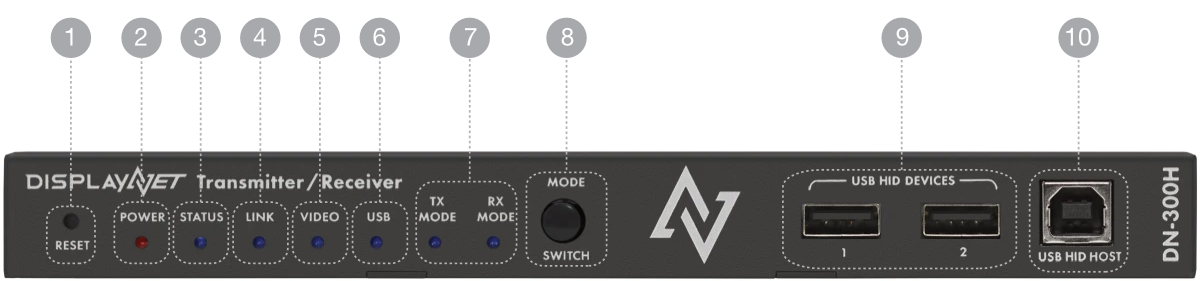
| 1 | Reset Button | To initiate a factory reset, press and hold this button while applying power. Continue to hold the button for about 30 seconds. Once any of the other LEDs (other than the power light) light up, release the button. |
| 2 | Power Light | Off: The device is not receiving power. On: The device is receiving power. |
| 3 | Status Light | Indicates the overall operational status and network connectivity state of the device. |
| 4 | Link Light | Indicates whether there are 10GbE Ethernet packets being transmitted or received. Off: Packets are not being transmitted/received and the device is not linked. Blinking: Packets are being transmitted/received and the device is linked. On: Device is linked but no packet activity. |
| 5 | Video Light | Indicates whether the video is stable or not. Stability is established when at least two consecutive video frames have the same horizontal and vertical active dimensions. Off: No stable video detected. On: Stable video detected. |
| 6 | USB Light | Indicates whether the USB HID connection is active or not. Off: No active connection to USB HID devices. Blinking: Connection to USB HID devices is active. |
| 7 | Mode Lights | Indicates the current operating mode: TX (Transmit) or RX (Receive). Only one mode light will be illuminated at a time. |
| 8 | Mode Switch | Push-button for operating mode selection between TX and RX modes. Press to cycle between available operating modes. |
| 9 | USB Device Ports | 2x Female USB 2.0 Type-A connectors for connecting USB HID devices (keyboards, mice, touch devices). HID switching provides instant switching between host and remote locations. |
| 10 | USB Host Port | 1x Female USB 2.0 Type-B connector to connect to the USB host device for HID device extension and switching. |
Rear Panel Layout
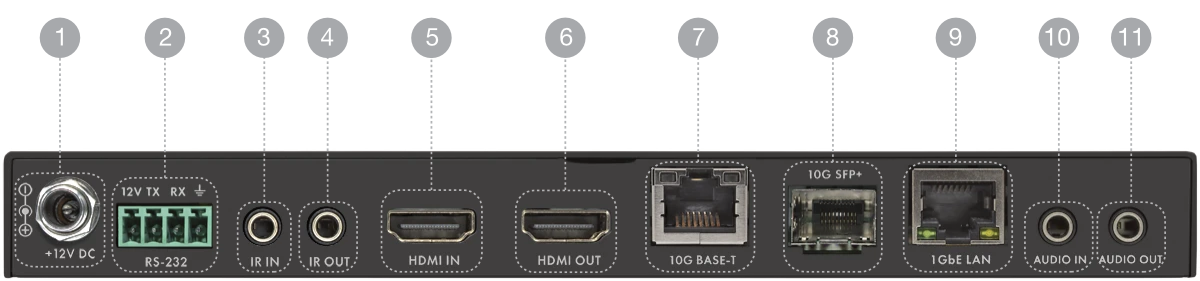
| 1 | 12V DC Power Jack | Connect the included External AC Power Adapter to this screw-locking receptacle. |
| 2 | RS-232 Phoenix Connector | 4-pin, 3.5mm pitch Phoenix connector for bidirectional RS-232 communication pass-through. Mates with Phoenix p.n. 1844223. UART interface with up to 115,200 baud. |
| 3 | IR In | 3.5mm Mini-Jack. Connect IR receiver to send IR signal over 10GbE connection to listener device. |
| 4 | IR Out | 3.5mm Mini-Jack. Connect IR transmitter to accept IR signal from a sender device and output to a source device. |
| 5 | HDMI In | 19-pin Female HDMI connector. Connect to the HDMI source device when operating in TX mode. |
| 6 | HDMI Out | 19-pin Female HDMI connector. Connect to the HDMI destination device when operating in RX mode, or use as loopout when operating in TX mode. |
| 7 | 10GbE Copper Port (RJ-45) | Shielded RJ45 connector with LED indicators. Connect to a 10GbE Ethernet network switch using CAT-6A or CAT-7 cable. Supports PoE+ (IEEE 802.3at) power delivery. |
| 8 | 10GbE Fiber Port (SFP+) | Fiber Optic SFP+ slot (SFP+ module sold separately). Supports single-mode and multi-mode fiber connections up to 30km distance. |
| 9 | 1GbE Copper Port | Shielded RJ45 connector with LED indicators. Automatically bridged to the active 10GbE interface for connecting peripheral devices up to 1Gbps. |
| 10 | Audio In | 3.5mm Stereo Mini-Jack for analog stereo audio input. Unbalanced analog stereo with up to 24-bit depth and fixed 48 kHz sampling rate. |
| 11 | Audio Out | 3.5mm Stereo Mini-Jack for analog stereo audio output. Unbalanced analog stereo with up to 24-bit depth and fixed 48 kHz sampling rate. |
DN-300T Hardware Layout
Front Panel Layout
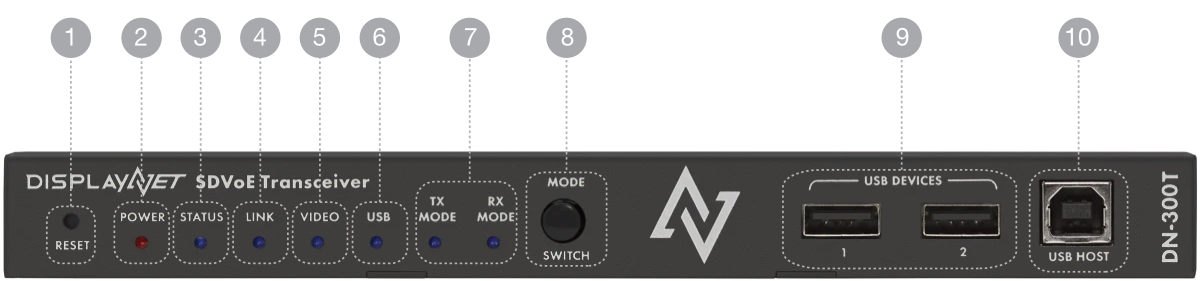
| 1 | Reset Button | To initiate a factory reset, press and hold this button while applying power. Continue to hold the button for about 30 seconds. Once any of the other LEDs (other than the power light) light up, release the button. |
| 2 | Power Light | Off: The device is not receiving power. On: The device is receiving power. |
| 3 | Status Light | Indicates the overall operational status and network connectivity state of the device. |
| 4 | Link Light | Indicates whether there are 10GbE Ethernet packets being transmitted or received. Off: Packets are not being transmitted/received and the device is not linked. Blinking: Packets are being transmitted/received and the device is linked. On: Device is linked but no packet activity. |
| 5 | Video Light | Indicates whether the video is stable or not. Stability is established when at least two consecutive video frames have the same horizontal and vertical active dimensions. Off: No stable video detected. On: Stable video detected. |
| 6 | USB Light | Indicates whether the USB 2.0 connection is active or not. Off: No active connection to USB devices. Blinking: Connection to USB devices is active. |
| 7 | Mode Lights | Indicates the current operating mode: TX (Transmit), RX (Receive), or TRX (Transceiver). Multiple mode lights may be illuminated simultaneously in TRX mode. |
| 8 | Mode Switch | Push-button for operating mode selection between TX, RX, and TRX modes. Press to cycle between available operating modes. |
| 9 | USB Device Ports | 2x Female USB 2.0 Type-A connectors for connecting USB 2.0 devices. Full USB 2.0 specification compliance with 480 Mbps data transfer speed and virtual hub functionality. |
| 10 | USB Host Port | 1x Female USB 2.0 Type-B connector to connect to the USB host device for full USB 2.0 extension with virtual hub capability supporting up to 7 RX units per TX. |
Rear Panel Layout
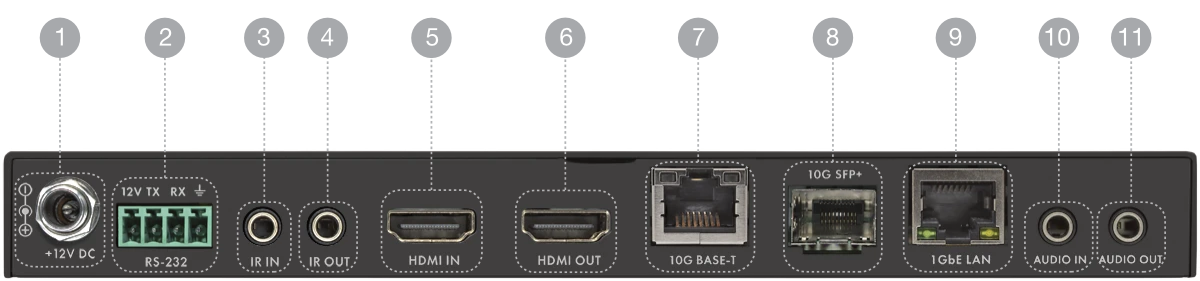
| 1 | 12V DC Power Jack | Connect the included External AC Power Adapter to this screw-locking receptacle. |
| 2 | RS-232 Phoenix Connector | 4-pin, 3.5mm pitch Phoenix connector for bidirectional RS-232 communication pass-through. Mates with Phoenix p.n. 1844223. UART interface with up to 115,200 baud. |
| 3 | IR In | 3.5mm Mini-Jack. Connect IR receiver to send IR signal over 10GbE connection to listener device. |
| 4 | IR Out | 3.5mm Mini-Jack. Connect IR transmitter to accept IR signal from a sender device and output to a source device. |
| 5 | HDMI In | 19-pin Female HDMI connector. Connect to the HDMI source device. Available in TX and TRX operating modes only. |
| 6 | HDMI Out | 19-pin Female HDMI connector. Connect to the HDMI destination device. Available in all operating modes. |
| 7 | 10GbE Copper Port (RJ-45) | Shielded RJ45 connector with LED indicators. Connect to a 10GbE Ethernet network switch using CAT-6A or CAT-7 cable. Supports PoE+ (IEEE 802.3at) power delivery. |
| 8 | 10GbE Fiber Port (SFP+) | Fiber Optic SFP+ slot (SFP+ module sold separately). Supports single-mode and multi-mode fiber connections up to 30km distance. |
| 9 | 1GbE Copper Port | Shielded RJ45 connector with LED indicators. Automatically bridged to the active 10GbE interface for connecting peripheral devices up to 1Gbps. |
| 10 | Audio In | 3.5mm Stereo Mini-Jack for analog stereo audio input. Unbalanced analog stereo with up to 24-bit depth and fixed 48 kHz sampling rate. |
| 11 | Audio Out | 3.5mm Stereo Mini-Jack for analog stereo audio output. Unbalanced analog stereo with up to 24-bit depth and fixed 48 kHz sampling rate. |
Connection Warning
The 10GbE ports are designed to connect to compatible DVIGear products and 10GbE network switches only. Do not connect any device to the 10GbE ports unless you are sure it is compatible.
Warranty
| Standard Warranty | 3 years parts and labor from date of purchase |
| Geographic Coverage | Worldwide through authorized service network |
| Warranty Exclusions | Damage from misuse, modifications, or improper care |