
Device Settings
Introduction
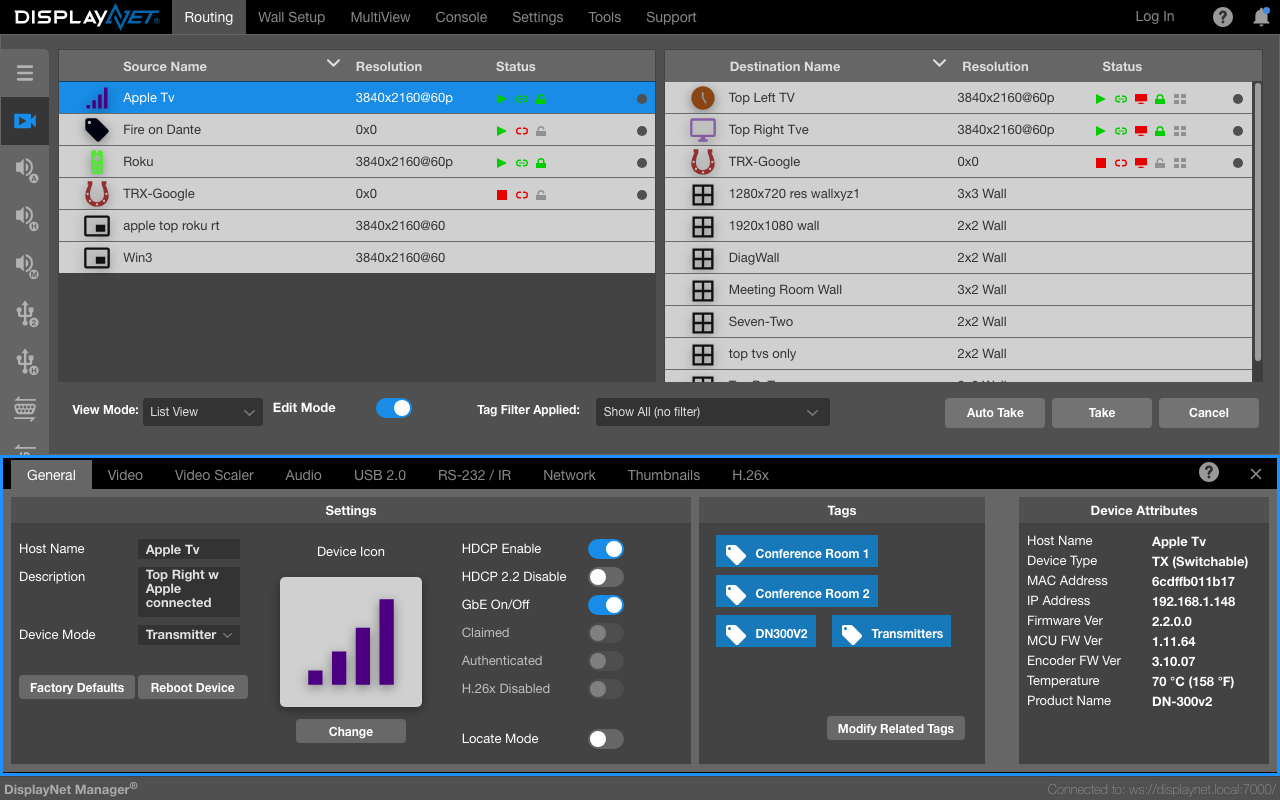
The "Device Settings rollup" is a window presenting comprehensive details about a DisplayNet device. It contains multiple tabs, and the visibility of certain tabs depends on the device's capabilities.
Accessing the Device Settings Rollup
The Device Settings rollup is accessed by double-clicking on a Device Row (in many areas of DisplayNet) or on the Routing Tab, by right-clicking on a Device Row and selecting "Device Settings."
The Device Settings Rollup Tabs
Not all tabs are visible for every device. Tab visibility depends on the device type and capabilities. For example, Video Scaler, Thumbnails, and H.26x tabs appear only for transmitter devices, while USB HID appears only for devices with USB HID capability.
Device Attributes Panel
The Device Attributes panel is displayed on the right side of the Device Settings rollup alongside all tabs. It shows key device information including Host Name, Device Type, MAC Address, IP Address, Firmware Version, and Temperature.
The majority of Device Settings for individual DisplayNet devices are stored directly on each respective device. Nevertheless, specific items might also be stored in the cache on the device where the software is running.
Most of the Device Settings are identical for Source and Destination devices. The unique settings will be described later in this chapter.