
Audio Tab
The Audio tab contains device settings and information regarding the audio routing functionality of each DisplayNet device.
Settings Panel For Transmitters
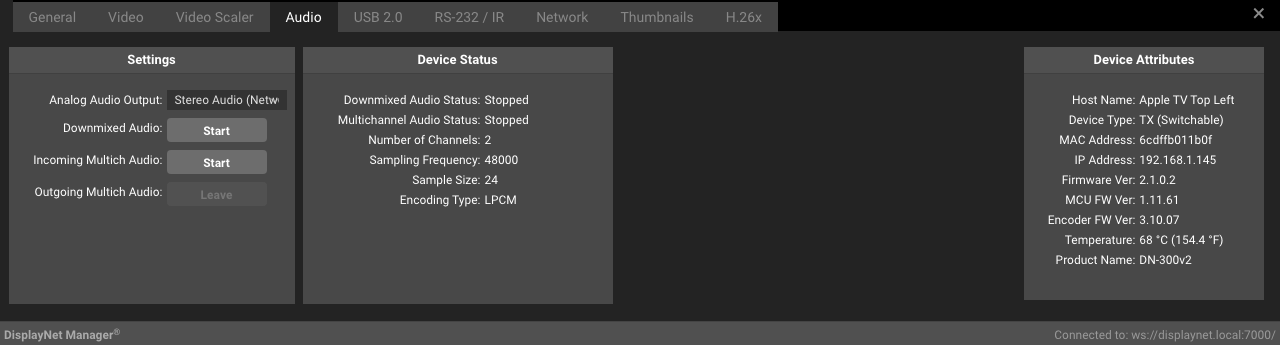
Settings Panel For Receivers
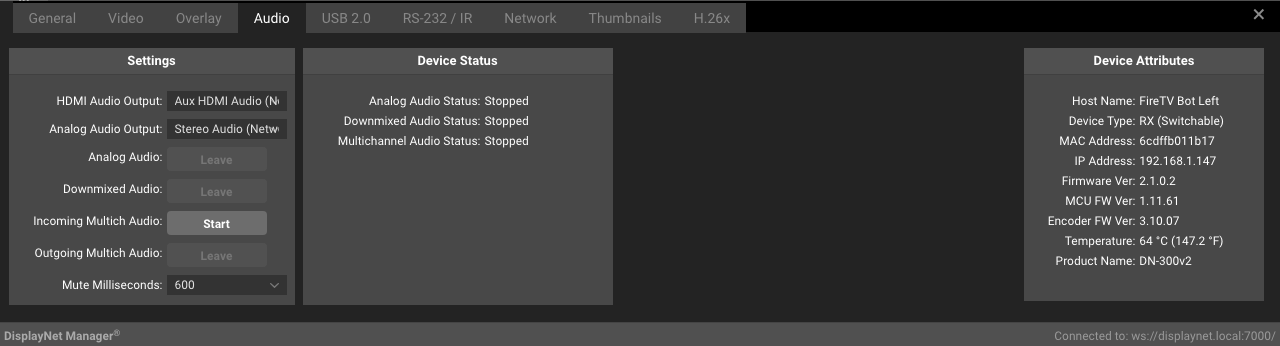
The following settings are available in the Setting Panel of the Audio Tab. Some options are not available for all devices and are hidden when not applicable.
| Setting | Description |
|---|---|
| Audio Port | DN-200 Series transmitters are equipped with a 3.5mm analog audio jack that may be configured as either an input or an output. Input: The 3.5mm audio port will act as an input. This is the default setting. Output: The HDMI signal’s audio will be downmixed to 2-channel and provided on the transmitter’s audio port. The downmixed audio will also be available for downstream routing as usual. |
| Dante Out (TX Only) | Dante is a digital audio networking technology developed by Audinate. This setting controls the signal that is sent to the Dante network on Dante-equipped DisplayNet transmitters. All Channels: The first two channels of the local HDMI audio signal will be sent to the Dante network. Downmix: The local HDMI Downmixed audio signal will be sent to the Dante network. Analog: The local Analog audio input signal will be sent to the Dante network. |
| HDMI Audio Output (RX Only) | HDMI Audio (Network): The assigned audio stream will be embedded on the HDMI output stream, this stream is independently routable, carries all channels, and is not downmixed. Aux HDMI Audio (Network): In Genlocked Mode, the audio from the DisplayNet Source device’s HDMI video signal can be passed, unaltered, to the Destination Device’s HDMI port. This stream is only available in Genlocked mode and cannot be routed independently, the audio from the genlocked source will be played. Stereo Audio (Network): The assigned analog input stream will be embedded on the HDMI output stream. HDMI Downmixed Audio (Network): The assigned downmixed audio stream will be embedded on the HDMI output stream. MultiCh Audio (Network): The assigned Multichannel input stream will be embedded on the HDMI output stream. DN-300 devices use this stream to support bi-directional Analog Audio. MultiCh Audio (Local): The local Multichannel input stream will be embedded on the HDMI output stream. On DN-300, this will route the 3.5mm analog audio input on the device to the HDMI output stream in RX mode. |
| Analog Audio Output | HDMI Downmix Audio (Network): The assigned downmixed audio stream will be provided on the analog output. Stereo Audio (Network): The assigned analog input stream will be provided on the analog audio output. MultiCh Audio (Network): The assigned Multichannel input stream will sent to the analog audio port. DN-300 devices use this stream to support bi-directional Analog Audio. MultiCh Audio (Local): The local Multichannel input stream will be sent to the analog audio port. |
| Analog Audio | Transmitters: This button starts and stops the Analog Audio stream. Existing routings will be preserved even if the stream is stopped, and audio will resume as soon as the stream is restarted. Receivers: The Leave button leaves the Analog Audio stream. This removes the routing from the system, if the stream is to be resumed, the routing must be completed again. The transmitted stream will not be affected by this action. If no stream is currently routed, the Leave button will be grayed out. |
| Downmixed Audio | Transmitters: This button starts and stops the Downmixed Audio stream. Existing routings will be preserved even if the stream is stopped, and audio will resume as soon as the stream is restarted. Receivers: The Leave button leaves the Downmixed Audio stream. This removes the routing from the system, if the stream is to be resumed, the routing must be completed again. The transmitted stream will not be affected by this action. If no stream is currently routed, the Leave button will be grayed out. |
| Outgoing Multich Audio (TX Only) | DN-300 devices use the MultiChannel Audio layer to route 3.5mm analog audio. This enables bi-directional analog audio, which is not natively supported by SDVoE's Analog Audio layer. Start: The multichannel audio stream from the device's 3.5mm input will be transmitted via multicast. Stop: The multichannel audio stream will stop multicast transmission. Existing routings are preserved and audio will resume when restarted. |
| Incoming Multich Audio (RX Only) | This setting allows the receiver to leave (disconnect from) an incoming multichannel audio stream. Leave: Disconnects from the multichannel audio stream. To resume audio, the routing must be re-established. If no stream is currently routed, the Leave button will be disabled. |
| Mute Milliseconds (RX Only) | This property allows the duration to mute the HDMI audio during a source transition to be modified. The acceptable range is between 0 and 5000 |
Device Status Panel
| Setting | Description |
|---|---|
| Analog Audio Status | Streaming: The audio stream is active and is being either transmitted or received, depending on the device type. Stopped: The audio stream is inactive. |
| Downmixed Audio Status | Streaming: The audio stream is active and is being either transmitted or received, depending on the device type. Stopped: The audio stream is inactive. |
| Analog Source (RX Only) | The source of the analog audio stream. |
| Mutichannel Source (RX Only) | The source of the Multichannel audio stream. |
| HDMI Source (RX Only) | The source of the HDMI audio stream. |
| Number of Channels (TX Only) | The number of channels in the HDMI source signal. |
| Sampling Frequency (TX Only) | The sampling frequency of the HDMI source signal. |
| Sampling Size (TX Only) | The sampling size of the HDMI source signal. |
| Encoding Type (TX Only) | The encoding type of the HDMI source signal. |
DN-300 devices use the MultiChannel Audio layer to route 3.5mm analog audio. This is done to enable bi-directional analog audio, which is not natively supported by SDVoE's Analog Audio layer.
Downmixed analog output of the HDMI source audio is only available for sources with PCM format audio. Dolby Digital, DTS, and other codecs are not supported.
Suppose a room is designed with an audio system that is separate from the video system. In this case, it is useful that the DisplayNet Transmitter can break-out a downmixed version of the HDMI embedded audio for use in the audio system.
info HDMI embedded audio is only available for HDMI output when the receiver is operating in Genlocked Mode.
HDMI embedded audio always follows the video stream. However, the analog audio, HDMI (All) audio, and downmixed audio streams may be routed completely independently.