
Device Attributes
The Device Attributes panel is always shown when the Device Settings Rollup is open and located on the right side. It displays the Host Name, Device Type, MAC Address, IP Address, Firmware Version, Temperature, and Video Bandwidth used of the selected device.
Device Attributes Panel
This panel is located on the right side of the Device Settings Rollup for all types of DisplayNet devices.
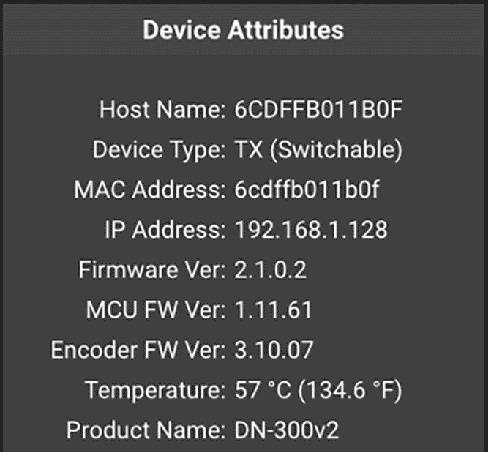
The following settings are available in the Device Attributes Panel of the Device Settings Rollup for transmitters and receivers:
| Attribute | Example | Description |
|---|---|---|
| Host Name | Bottom Right | The Host Name is used to reference the source/destination in the system, and is limited to 19 characters. |
| Device Type | Transmitter | This is the type of the selected DisplayNet device. It can be a Transmitter (TX), Receiver (RX), or a Transceiver (TRX). |
| MAC Address | 123456789ABC | Each DisplayNet transmitter or receiver device includes a unique MAC Address which is permanent and factory-assigned. |
| IP Address | 192.168.1.128 | The current IP address of the DisplayNet device is shown here. |
| Firmware Version | 2.1.0.2 | This is the firmware version of the DisplayNet device. Please contact DVIGear technical support for more details. |
| MCU FW Version | 1.11.61 | This is the firmware version of MCU chip on your the DisplayNet device. (if it exists on your device) Please contact DVIGear technical support for more details. |
| Encoder FW Version | 3.10.07 | This is the firmware version of Encoder chip on your the DisplayNet device. (if it exists on your device) Please contact DVIGear technical support for more details. |
| Temperature | 57 °C (134.6 °F) | This displays the last-known temperature of the device in both Celsius and Fahrenheit. |
| Product Name | DN-300v2 | The product name of the device. |