
H.26x Tab
The H.26x tab contains device settings and information related to the H.26x routing functionality of each DisplayNet Device.
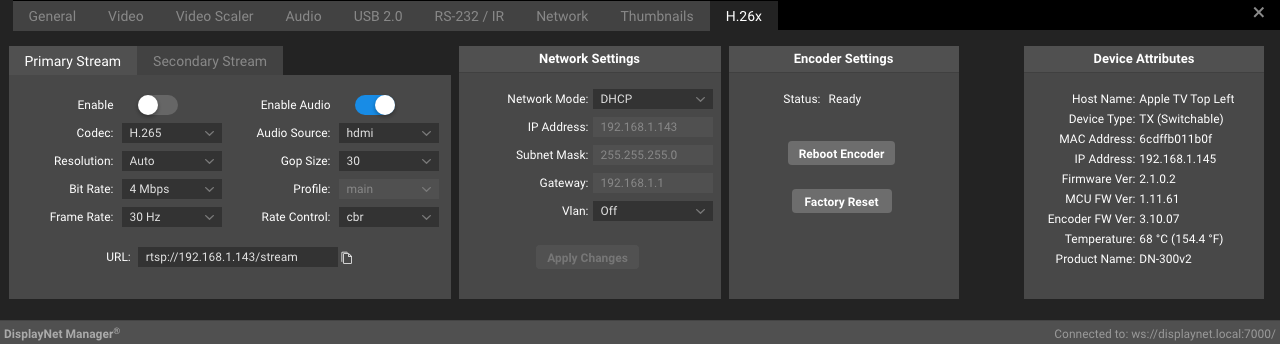
Primary Stream Panel
The following settings are available in the Primary Stream Panel in the H.26x Tab:
| Setting | Description |
|---|---|
| Enable | Toggle to enable or disable the Primary H.26x stream. |
| Codec | The codec used for the Primary H.26x stream. Available Values: H.264, H.265 |
| Resolution | The resolution of the Primary H.26x stream. Available Values: Auto, 1920x1080, 1280x720, 960x540, Custom |
| Bitrate | The bitrate of the Primary H.26x stream. Available Values: 1, 2, 4, 6, 8, 10, 12, 16, 20 Mbps |
| Frame Rate | The frame rate of the Primary H.26x stream. Available Values: 4-30 fps |
| Enable Audio | Enables or disables audio in the Primary H.26x stream. Available Values: Enabled, Disabled |
| Audio Source | The audio source of the Primary H.26x stream. Available Values: HDMI, Analog |
| Gop Size | The GOP size of the Primary H.26x stream. Available Values: 1-60 |
| Profile | The profile of the Primary H.26x stream. Available Values: Baseline, Main, High If the encoder is h265, this is set to readonly and set to main, otherwise, the profile is set to whatever the device reports. |
| Rate Control | The rate control of the Primary H.26x stream. Available Values: Constant Bitrate, Variable Bitrate |
| URL | The URL of the Primary H.26x Stream. |
Secondary Stream Panel
The Secondary Stream Panel looks just like the Primary Stream Panel, but is used for the secondary stream.
The following settings are available in the Secondary Stream Panel in the H.26x Tab:
| Setting | Description |
|---|---|
| Enable | Toggle to enable or disable the Secondary H.26x stream. |
| Codec | The codec used for the Secondary H.26x stream. Available Values: H.264, H.265 |
| Resolution | The resolution of the Secondary H.26x stream. Available Values: 960x540, 480x270, 320x180, Custom |
| Bitrate | The bitrate of the Secondary H.26x stream. Available Values: 1, 2, 4, 6, 8, 10, 12, 16, 20 Mbps |
| Frame Rate | The frame rate of the Secondary H.26x stream. Available Values: 4-30 fps |
| Enable Audio | Enables or disables audio in the Secondary H.26x stream. Available Values: Enabled, Disabled |
| Audio Source | The audio source of the Secondary H.26x stream. Available Values: HDMI, Analog |
| Gop Size | The GOP size of the Secondary H.26x stream. Available Values: 1-60 |
| Profile | The profile of the Secondary H.26x stream. Available Values: Baseline, Main, High If the encoder is h265, this is set to readonly and set to main, otherwise, the profile is set to whatever the device reports. |
| Rate Control | The rate control of the Secondary H.26x stream. Available Values: Constant Bitrate, Variable Bitrate |
| URL | The URL of the Secondary H.26x Stream. |
Custom Resolution
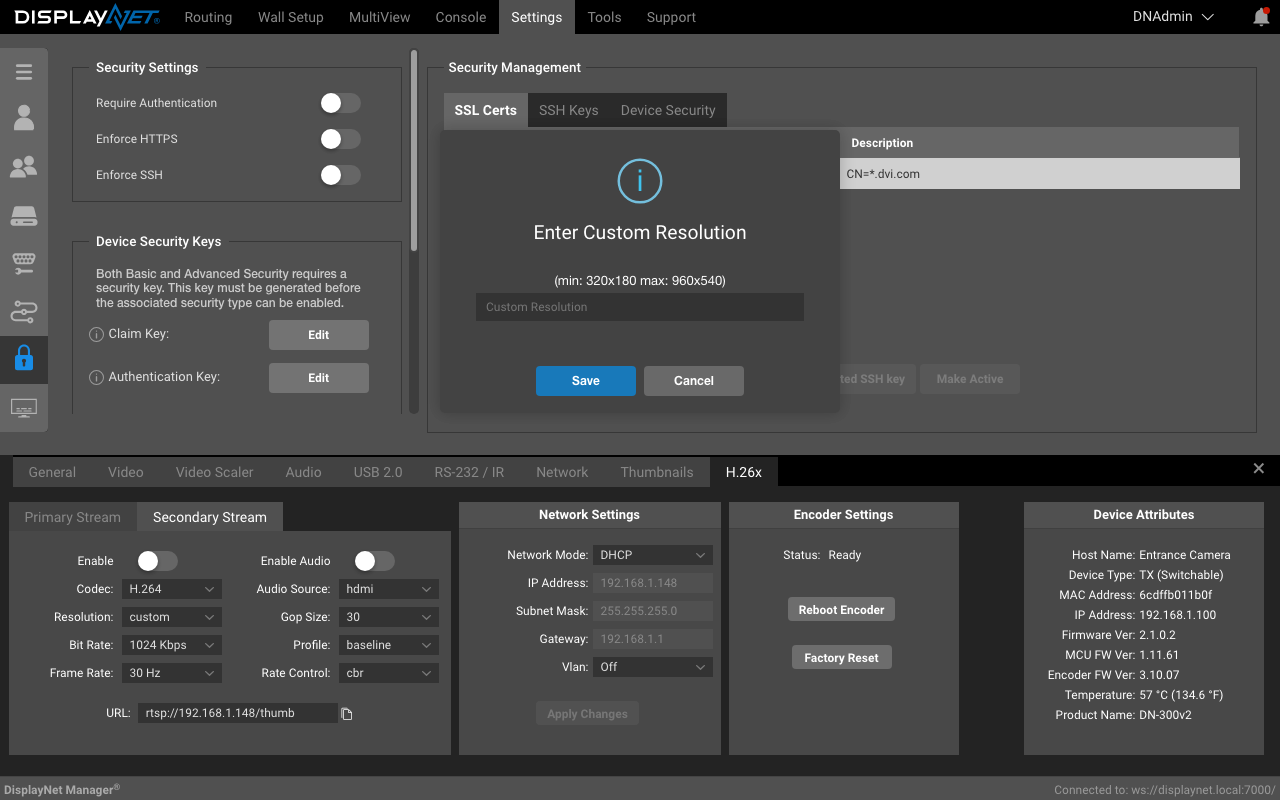
Selecting the Custom Resolution option will bring up the following dialog, the only difference between the primary and secondary stream is the resolution limits.
- The primary stream limits are min: min: 960x540 max: 1920x1080.
- The secondary stream limits are min: 320x180 max: 960x540.
Network Settings Panel
The following settings are available in the Network Settings Panel in the H.26x Tab:
| Setting | Description |
|---|---|
| Network Mode | The network mode of the device. Available Values: Static, DHCP |
| IP Address | The IP address of the device. |
| Subnet Mask | The subnet mask of the device. |
| Gateway | The gateway of the device. |
| Vlan ID | The VLAN ID of the device. Range 0 - 4094 (0 corresponds to vlan off) |
| Apply Changes Button | Applies any changes made in the Network Settings Panel. |
Encoder Settings Panel
The following settings are available in the Encoder Settings Panel in the H.26x Tab:
| Setting | Description |
|---|---|
| Status | Ready, Starting, Running, Stopping, Error |
| Reboot Encoder button | Reboots the encoder. |
| Factory Reset button | Resets the encoder to factory defaults. |