
RS232 / IR Tab
The RS-232/IR Tab is used to configure the connection settings used by a DisplayNet device for RS-232 and IR communications. For two RS-232 devices to communicate with each other, they must have the same connection settings. To make system-wide RS-232 setting adjustments, use the RS-232 Settings located in the Settings Tab.
Settings Panel
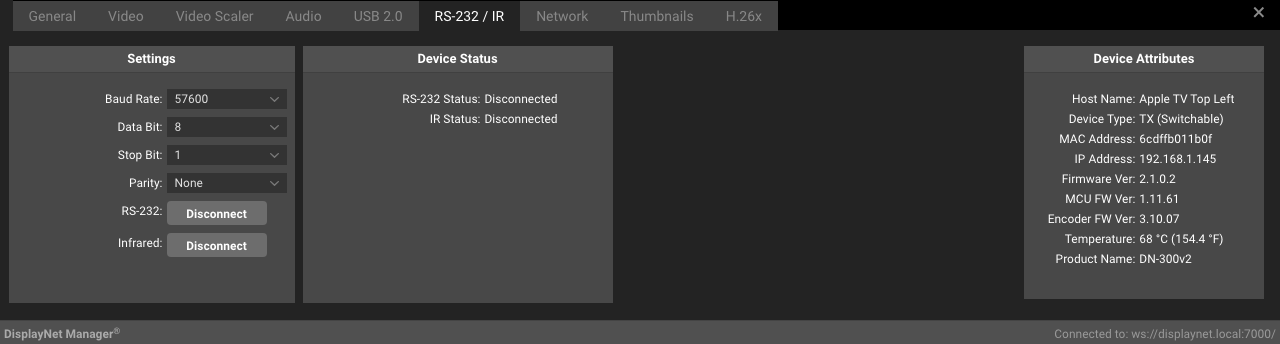
Before making any changes, please take note of current settings, as incorrect settings will prevent devices from successfully communicating over RS-232. Consult a qualified technician if needed.
The following settings are available in the Settings Panel of the RS-232/IR Tab for transmitters and receivers:
| Setting | Description |
|---|---|
| Baud | Sets the Baud of the RS-232 connection. Available Values: 1200 2400 4800 9600 19200 38400 57600 76800 96000 115200 230400 460800 |
| Data Bit | Sets the Data Bit of the RS-232 connection. Available Values: 7, 8 |
| Stop Bit | Sets the Stop Bit of the RS-232 connection. Available Values: 1, 2 |
| Parity | Sets the Parity of the RS-232 connection. Available Values: None, Even, Odd |
| RS-232 | The Disconnect button disconnects any active RS-232 connections. |
| IR | The Disconnect button disconnects any active IR connections. |
Device Status Panel
The following settings are available in the Device Status Panel of the RS-232/IR Tab for transmitters and receivers:
| Setting | Description |
|---|---|
| RS-232 Status | The status of the RS-232 connection. Available Values: Connected, Disconnected |
| IR Status | The status of the IR connection. Available Values: Connected, Disconnected |