
USB 2.0 Tab
The USB 2.0 tab contains device settings and information related to the USB 2.0 routing functionality of each DisplayNet Device.
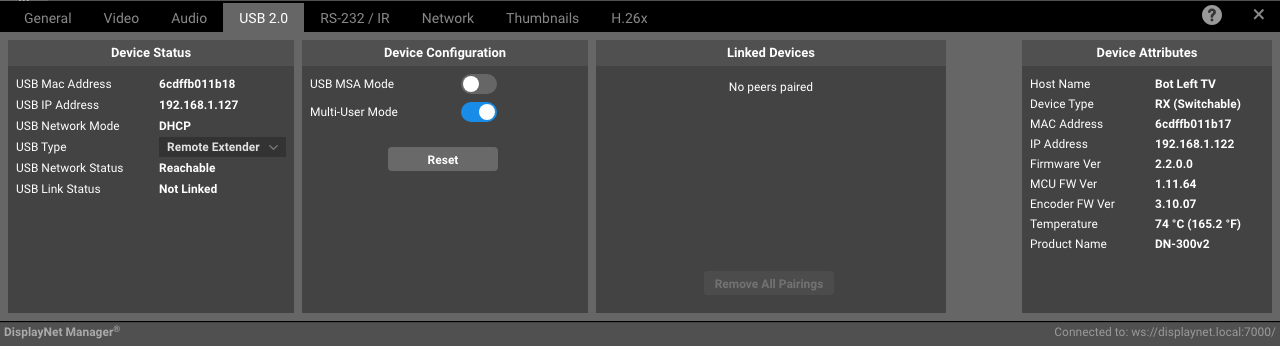
Device Status Panel For Receivers
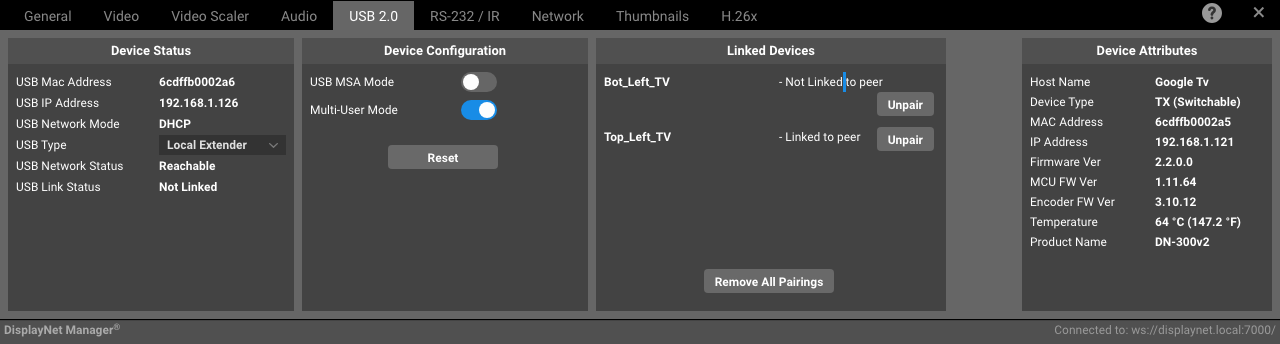
Device Status Panel For Transmitters
Device Status Panel
USB Mac Address: The MAC address of the USB 2.0 interface on the device.
USB IP Address: The IP address of the USB 2.0 interface on the device.
USB Network Mode: The network mode of the USB 2.0 interface on the device.
USB Type: The selectable type of USB 2.0 interface on the device (e.g., Local Extender, Remote Extender). This can be changed independently of the device type (Tx/Rx).
USB Network Status: The network status of the USB 2.0 interface on the device. e.g., Reachable, Unreachable, or Disconnected.
USB Linked Status: The linked status of the USB 2.0 interface on the device. e.g., Linked or Unlinked.
Device Configuration Panel
USB MSA Mode: MSA (Mass Storage Acceleration) mode enables faster transfer rates on attached storage devices.
Multi-User Mode: The multi-user mode of the USB 2.0 interface on the device. This allows a Local Extender to be able to connect to multiple Remote Extenders, forming a virtual hub.
If Multi-User mode is enabled, MSA mode should be disabled, and vice versa. Failure to do so may cause instability with USB connections.
Reset: Clicking this button will reset the USB 2.0 interface on the device. This can be used when diagnosing USB connection issues.
Linked Devices
Here you can see the devices that are linked to the USB 2.0 interface on the device along with an Unpair button option to unlink them.
Unpairing a device will remove the device from the list of linked devices and will require the device to be re-paired in order to be used with the USB 2.0 interface on the device.