
Video Scaler Tab
The Video Scaler tab contains device settings and information regarding the scaled video stream (Stream 1) sent out by DisplayNet Devices transmitters. This stream is intended for multiview usage.
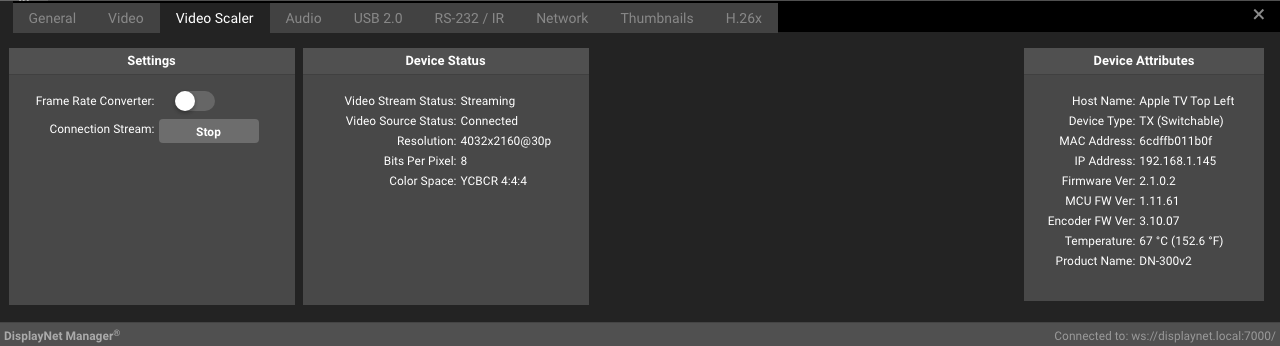
Settings Panel
The following settings are available in the Settings Panel:
| Setting | Description |
|---|---|
| Frame Rate Converter | The Frame Rate Converter converts the frame-rate to half of the framerate of the original source signal, by omitting every other frame. This may be enabled to reduce the bandwidth usage of the scaled stream, allowing for more complex multiview layouts as well as the simultaneous use of Stream 0 and Stream 1 in certain cases. |
| Connection Stream | This setting starts or stops the scaled video stream, known as Stream 1. Stream 1 is used exclusively for multiview, and is not enabled by default. This setting may be used in troubleshooting multiviewer layouts. |
Device Status Panel
The Device Status Panel shows the status of Stream 1, and contains the following attributes:
| Setting | Description |
|---|---|
| Video Stream Status | Streaming: Video output stream is started. Stopped: Video output stream is stopped. |
| Video Source Status | Connected: The HDMI input is connected and is receiving a signal. Disconnected: The HDMI input is disconnected or is not receiving a signal. |
| Resolution | Shows the current resolution of the input signal. For example: 3840x2160@24p corresponding to 3840 pixels wide and a height of 2160 pixels with 24 frames per second (fps). |
| Bits Per Pixel | Shows the most recently used HDMI color depth. Possible values: 8, 10, 12 |
| Color Space | Shows the most recently-used HDMI color space. Possible values: RGB, YCbCr420, YCbCr422, YCbCr444 |