
RS-232 Layer
The RS-232 Layer can be used to set up pass-through serial communication between DisplayNet devices. In contrast to the video and audio layers, RS-232 or IR data may be sent from any DisplayNet endpoint (TX or RX) to any other DisplayNet endpoint (TX or RX). For instance, a DisplayNet RX may send RS-232 data to a DisplayNet TX. Because of this, all transmitters and receivers will appear in the Sources panel and all transmitters and receivers will also appear in the Destinations panel.
The RS-232 Layer is color-coded yellow.
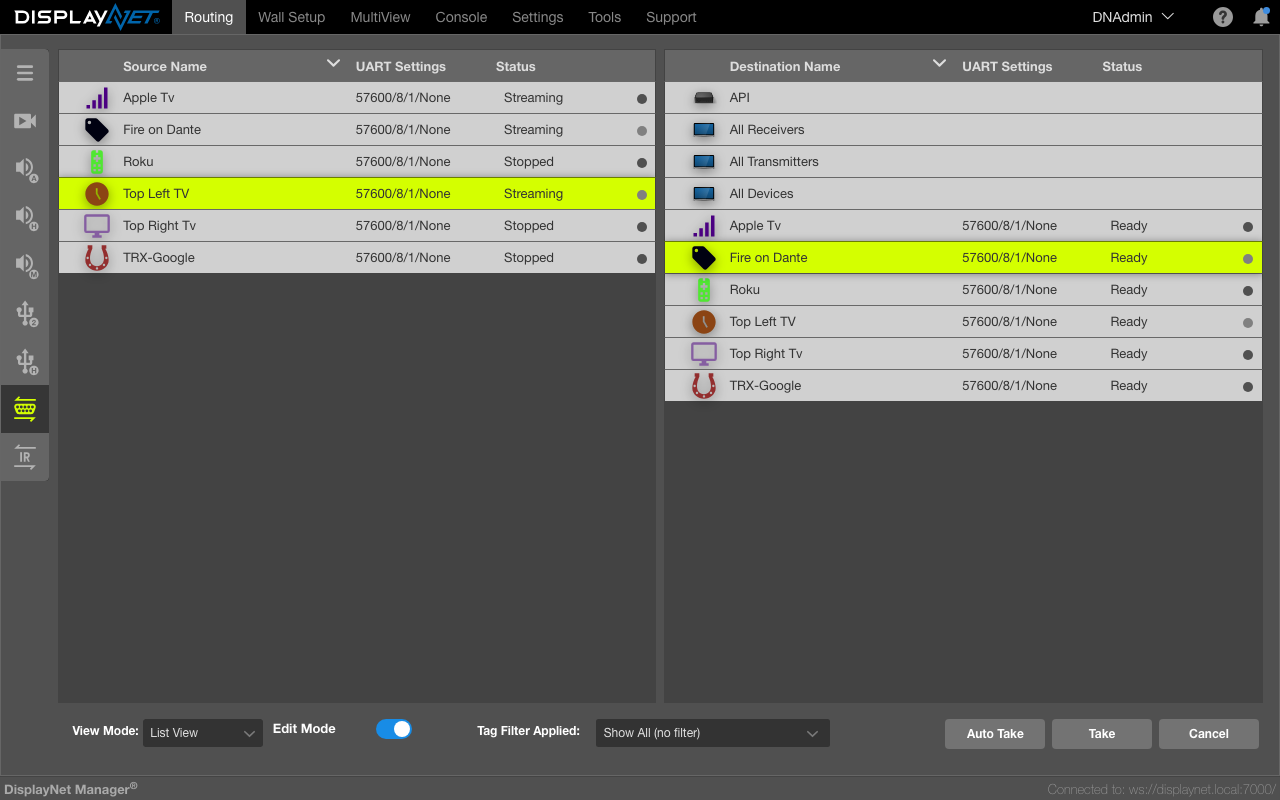
When two DisplayNet devices are joined together for RS-232 communication, one is defined as a sender and the other as a listener. The result is a unidirectional connection in which all RS-232 data coming into the sender's RS-232 port is transmitted over the network in unicast to the destination; the data is then sent out to the attached device via the TX/RX's RS-232 port.
By default, when creating an RS-232 route, DisplayNet Manager joins each device twice: once as a sender and again as a listener. This allows for bidirectional communication. This default behavior can be changed in the Settings Tab under Routing Options.
The Destinations panel includes three (3) special RS-232 destinations: All Receivers, All Transmitters, and All Devices. These destinations can be used to unidirectionally broadcast RS-232 communications to large numbers of devices. When a source is joined to any of these three destinations, the return join is not automatically created.
Multiple sender devices may be joined to a listener device. However, since RS-232 data is sent one character at a time, data sent simultaneously from multiple senders may arrive at the listener in an unpredictable order. In this case, RS-232-connected devices will need to rely on a higher-level application protocol to separate incoming characters and reconstruct data from individual devices.
The RS-232 ports on DisplayNet devices are only usable for connection routing and cannot be used to control the devices themselves. DisplayNet endpoints are controlled exclusively by DisplayNet Server over the network. DisplayNet Server does allow for RS-232 and IR data injection; this is an advanced topic that should be discussed with DVIGear technical support.
Before connecting devices for RS-232 communications, each endpoint's RS-232 settings should be updated to match the settings of other connected endpoints. This can be done using the Device Settings option. Alternatively, system-wide changes can be made in the Settings Tab under RS-232 Settings. Device Settings, which are device specific, take precedence over the system-wide settings.
A control PC will be used to remotely control a display using RS-232 commands. To accomplish this, the serial port on the control PC is connected to the serial port on the DisplayNet transmitter and the serial port on the display is connected to the serial port on the DisplayNet receiver. Both DisplayNet devices, as well as the control PC and the display, are configured with the same RS-232 settings. The connection between the control PC and the display is made using the RS-232 Routing Layer. The display can now be controlled by the control PC.