
Server Settings
DisplayNet Server provides a central interface between control equipment/software and DisplayNet endpoint devices. The options within the DisplayNet API Settings tab can be used to configure the connection between DisplayNet Server and the API Engine, which runs on the server.
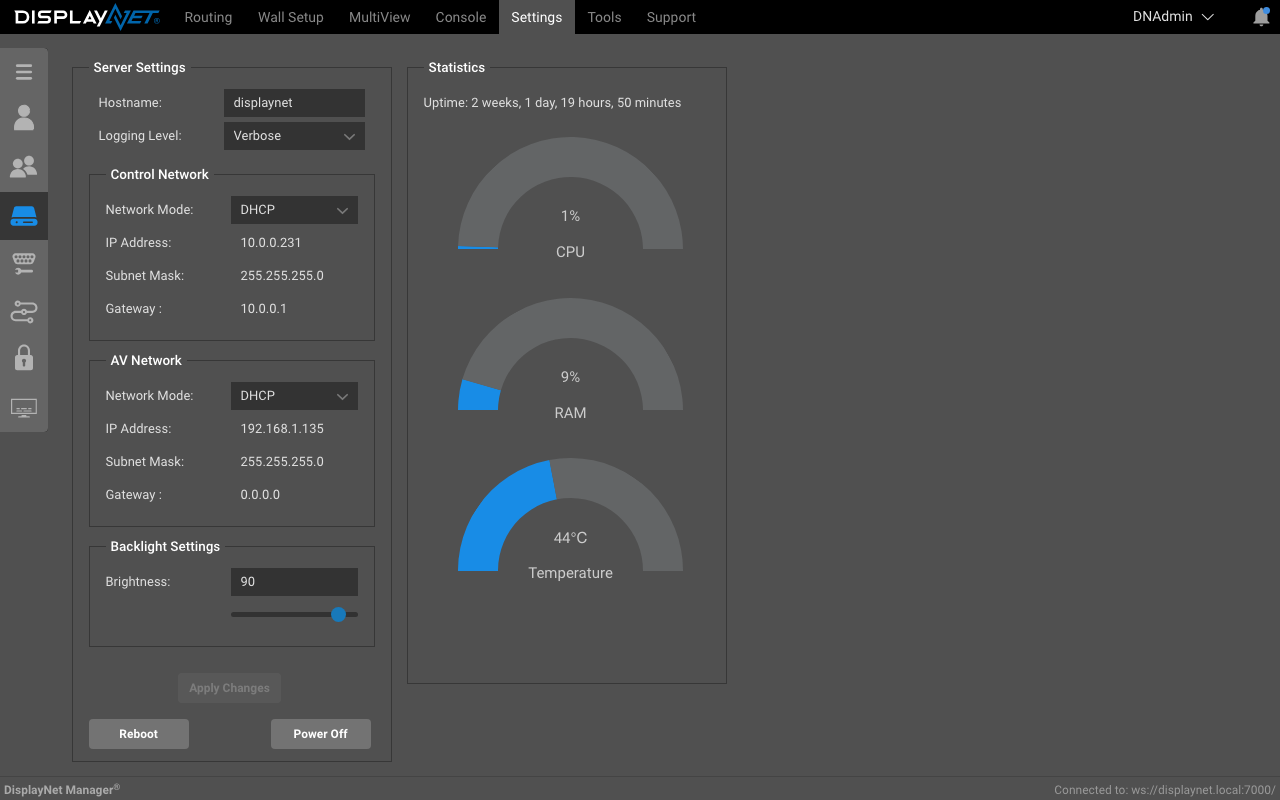
Hostname
The term "hostname" pertains to the Linux hostname assigned to the machine where the DisplayNet Server is located. The default hostname is "displaynet.local". This hostname can be changed to a custom name if the logged in user has administrative access.
Logging Level
This setting is only visible to admin users.
The logging level controls how much information is logged by the DisplayNet API. When a logging level is selected, the API logs all messages at that level and higher severity levels.
Available logging levels (from most to least verbose):
- Verbose - Maximum logging, includes all messages
- Debug - Debugging information
- Information - General operational messages
- Warning - Warning conditions
- Error - Error conditions (default)
- Critical - Critical error conditions only
- None - Disable logging entirely
For example, if the logging level is set to "Information", the API will log Information, Warning, Error, and Critical messages, but will not log Debug or Verbose messages.
Control and AV Network Settings
Settings changes to the Control and AV Network are restricted to admin users. The AV Network is used for sending and receiving AV signals, and the Control Network is used for sending and receiving control signals from the DisplayNet API server. DHCP is enabled by default and is recommended for most users. If DHCP is disabled, the IP address, subnet mask, and gateway must be manually configured.
Advanced network settings are beyond the scope of this document.
Backlight Settings
The "Backlight Settings" option, refers to the screen brightness on the front of the DisplayNet server.
Setting it to 100 is maximum brightness, and 0 is minimum or no brightness.
This setting is restricted to admin users.
Reboot and Power Off buttons
The Reboot and Power Off buttons are used to reboot or power off the DisplayNet server. These buttons are restricted to admin users.