
Device Temperature Warning Threshold
The Device Temperature Warning Threshold Tool is used to set the temperature at which a warning message will be displayed for devices. This is useful for monitoring the temperature of DisplayNet devices to prevent overheating.
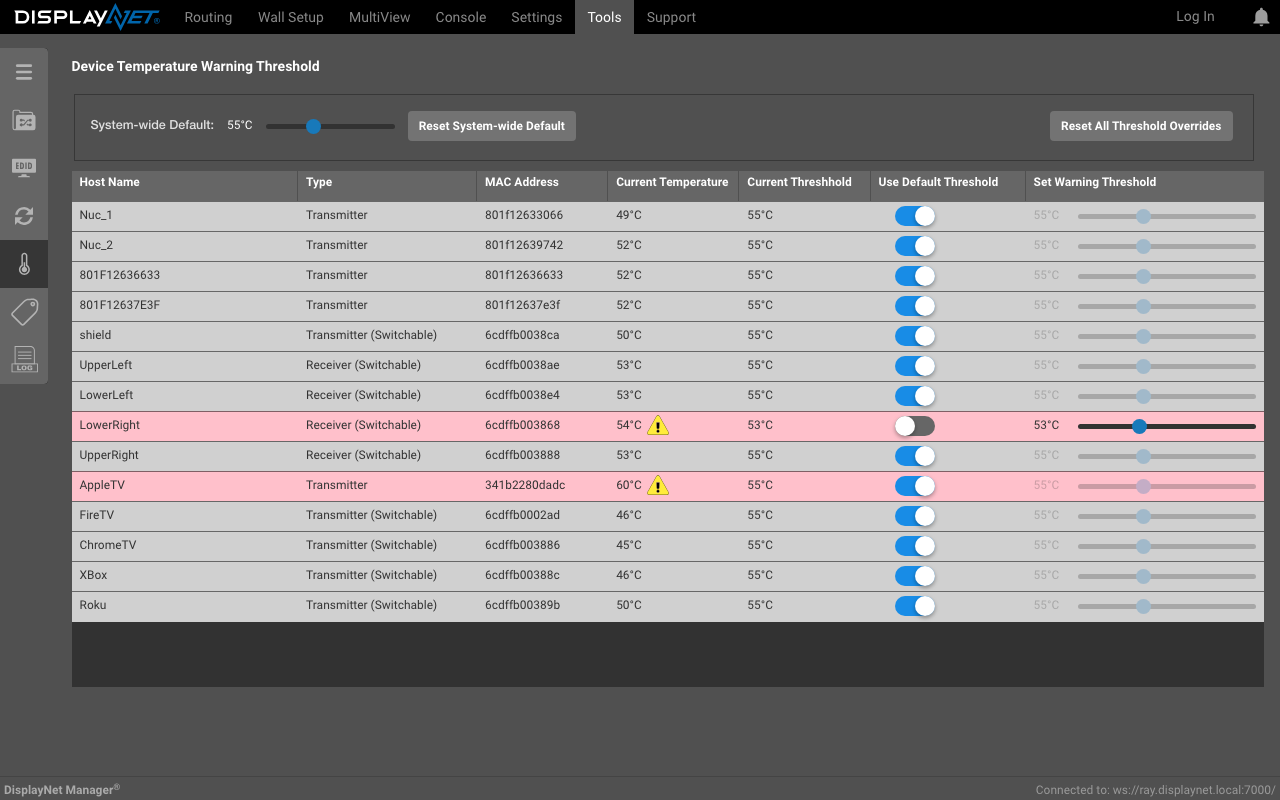
The system-wide default temperature warning threshold is 70 °C and can be changed manually changed by using the slider labeled 'System-wide Default'.
Each device can have its own temperature warning threshold. To change the temperature warning threshold for a specific device, click on device's 'Use Default Threshold' toggle which enables the device-specific temperature slider in the 'Set Warning Threshold' column. This allows the user to set the temperature warning threshold specific to that device.
Every minute, each device's temperature is compared to its temperature warning threshold. If the last warning for the device isn't the same as the last time it triggered, a warning message will be sent via the Notification Center. This will continue until the device's temperature is no longer in violation of its threshold.
To navigate to the Device Temperature Warning Threshold tab, click on the "Temp Warning Threshold" sidebar option in the Tools Tab.
The Device with Host Name 'AppleTV' has a temperature of 60°C which exceeds the Threshold of 55°C which was from the 'System-Wide Default' and hence is flagged and a warning message is displayed.
The Device with Host Name 'Lower Right' has a temperature of 54°C which exceeds the device's temperature threshold of 53°C which was manually-set as the device's 'Set Warning Threshold' column and hence is flagged and a warning message is displayed.
The remaining devices are not in violation of their temperature warning threshold and hence no warning message or indication is displayed.
The temperature warning thresholds can be set to any value between 0°C and 100°C and should take into consideration the operating temperature range provided in the specifications of the device.