
Network Hardware
Introduction
Regardless of technology, it is preferred to run high-performance AV-over-IP systems over a dedicated network to provide the required bandwidth and security needed for professional applications. The reason for this is that LAN (Local Area Network) traffic often comes in bursts, and it's common for specific ports on a network switch to experience occasional oversubscription. Compared to standard IT traffic, AV signals have greater, sustained bandwidth requirements. This places much greater demand on existing networks, which obliges IT Managers to demand isolated networks. In a dedicated DisplayNet content network, the only equipment directly connected to the 10GbE ports of the network switch are the DisplayNet transmitters and receivers, DisplayNet Server, the control system, and a DHCP server (if used).
Regardless of the control system used, all communications between control devices and the DisplayNet devices are distributed through the DisplayNet Server, which is the central control proxy. The DisplayNet Server receives Telnet commands from the control devices over port 6980, which are then translated by the DisplayNet API Engine and distributed to the DisplayNet devices via UDP over the 10GbE network.
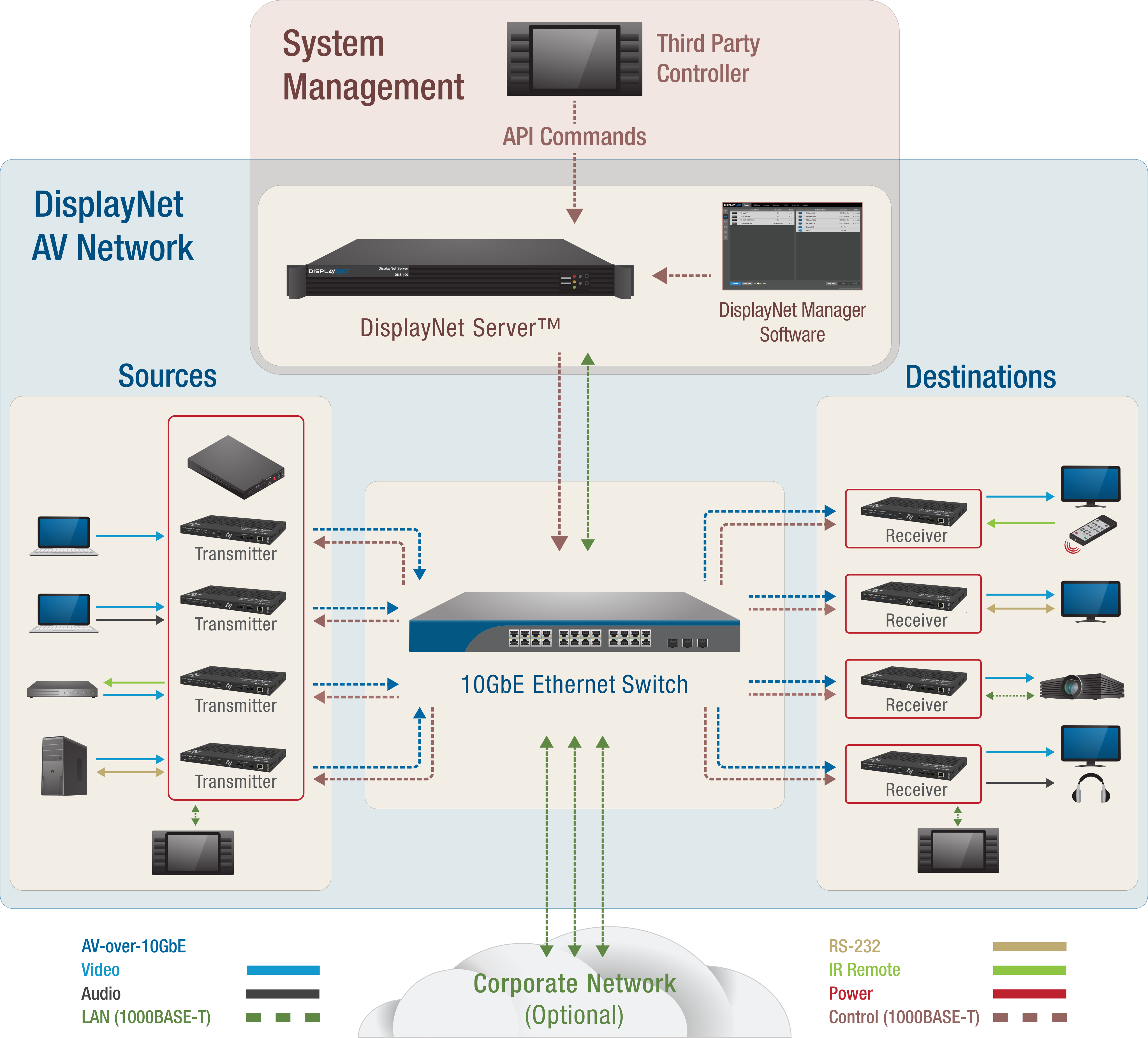
10GbE Network Switch
Required Features and Specifications
DisplayNet systems utilize standard off-the-shelf 10GbE network switches. This is possible because of SDVoE technology called ACR that guarantees synchronous data delivery without the need for a specialized switch. To support DisplayNet, these network switches must include the features mentioned below, which are ubiquitous and are found in nearly all 10GbE switches on the market. The following features are required for DisplayNet to function properly:
-
Non-blocking
This enables every port to operate at full duplex 10GbE capacity at all times. -
Multicasting with IGMP snooping
DisplayNet uses IP multicasting to route video and audio streams, as well as some RS-232 and IR communication. IGMP snooping enables the switch to only route multicast traffic to devices that are subscribed to a given multicast stream. If IGMP snooping is not present or is disabled, then the network switch will broadcast multicast traffic to all network devices, which will cause network flooding. -
Fast Leave
This feature enables devices to rapidly switch from one multicast group to another. Effectively, it reduces AV switching times. This is necessary to achieve seamless switching at higher resolutions. -
Port Capacity
It is critical to design systems with enough capacity to support current and possible future needs
Many 10GbE switches on the market today include these features, and all currently available 10GbE switches support IGMP snooping. For a list of recommended 10GbE network switches that may be used with DisplayNet, please contact DVIGear technical support.
It is possible for network switches to be stacked and uplinked for further expansion. However, this is not recommended unless the system is carefully designed and managed to avoid any oversubscription issues. Please consult a qualified IT system designer or contact DVIGear for more information.
Switch Configuration
The 10GbE network switch must be configured using the software supplied by the switch manufacturer. The software and settings available may differ by manufacturer and switch. The following list includes all network switch configuration options that DisplayNet requires. Look for these options when selecting and configuring the network switch.
| Setting | Description |
|---|---|
| IGMP snooping | Must be enabled |
| IGMP snooping on VLAN 1 (or other VLAN being used) | Must be enabled when all ports default to VLAN1. |
| Filter/Drop Unregistered Multicast traffic | Must be enabled if feature is present. If not applied, the behavior of the switch will be to broadcast multicasted packets to all ports if the switch has no known destination for those packets. |
| Unregistered Multicast Flooding | Must be disabled if feature is present. |
| IGMP Querier | Must be enabled if feature is present. |
| IGMP Querier on VLAN1 (or other VLAN being used) | Must be enabled if feature is present. |
| Set IGMP Version to IGMP V2 | Must be set if feature is present. |
| Fast Leave | Must be enabled if feature is present. |
| Fast Leave on port X | Must be enabled if feature is present. |
| Fast Leave for VLAN1 (or other VLAN being used) | Must be enabled if feature is present. |
DisplayNet devices use the IGMP snooping feature to enable receivers to join multicast groups. Some switches have the IGMP snooping feature disabled by default, and manual configuration is required. To configure the switch, use the software or interface provided by the switch manufacturer. Most of the time, a simple checkmark near “Enable IGMP snooping” is needed. As the implementation of IGMP snooping is vendor-specific, additional configuration may be required. For further details, consult the documentation included with your network switch.
Network Cabling
Type
High-grade network cabling is required to support the high bandwidth of DisplayNet AV-over-IP traffic and to guarantee the maximum cable extension distances. For all copper connections to the 10GbE ports on the network switch, DVIGear strongly recommends using premium quality CAT-6A F/UTP cables. In DisplayNet systems using CAT-6A, distances of up to 330 ft. (100 meters) from an endpoint to the switch (200 meters total, end to end) are supported. For added signal protection, F/UTP cables use foiled/unshielded twisted pairs and consist of four unshielded twisted pairs encased in an overall foil shield. This provides superior immunity to crosstalk, especially alien crosstalk, from adjacent cables in the same bundle. To further prevent alien crosstalk, it is recommended to avoid tightly bundling the cables. While there are many manufacturers of high-performance CAT-6A cabling, DVIGear recommends CAT-6A F/UTP cables with ZMAX terminations made by Siemon, which can be purchased by contacting Siemon.
In some markets, such as Europe, even higher grade cabling may be available, such as CAT-7 S/FTP. These use a shield over each pair, plus a shield and a copper braid over the entire cable assembly. These cables are normally not available in the USA. However, where available, they can be used as they exceed the capabilities of the recommended CAT-6A cables. Lower grade cabling such as CAT6 (250 MHz) is not recommended. At distances of 40 meters and longer, using CAT6 can introduce issues such as image distortion and signal failure.
Termination
For the 10GbE connection between the DisplayNet devices and the network switch, cable terminations can be performed in a straight-through scheme using either the TIA/EIA T568A or T568B standards. However, ** T568B ** is the preferred termination scheme.
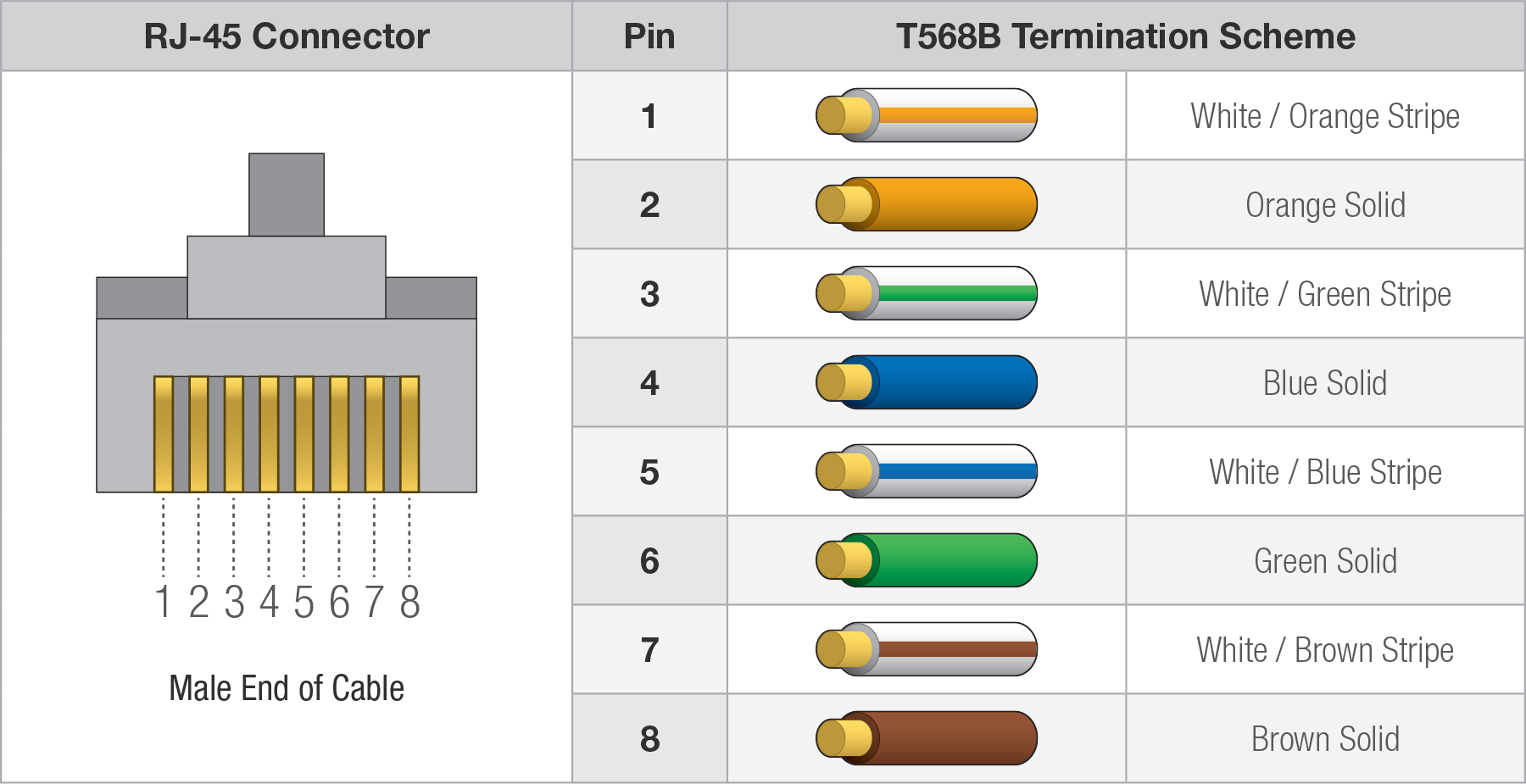
Be certain that the T568B termination scheme is used at both ends of the cable.
Please refer to the selected cable manufacturer for more information on proper grounding techniques for category cables.
DisplayNet Server
DisplayNet systems must include a DisplayNet server, which runs software DisplayNet Server that is required to control and manage the entire system. Disambiguation: The DisplayNet Server versus DisplayNet server. The DisplayNet Server provides a centralized control interface between the control equipment/software and the DisplayNet endpoint devices; therefore, it is a required part of every DisplayNet system. The DisplayNet API Engine is pre-installed on the server, as well as the web-based DisplayNet Manager application.
The DisplayNet Manager software and other control devices do not communicate directly with the endpoints. Instead, they send commands to the DisplayNet API Engine, which translates open DisplayNet API commands to proprietary UDP commands, which are used to control DisplayNet devices. DisplayNet API commands are sent from the control software and/or system to the API Engine over the standard Telnet protocol using port 6980; these commands are then translated by the API Engine and delivered to the endpoint devices over UDP.
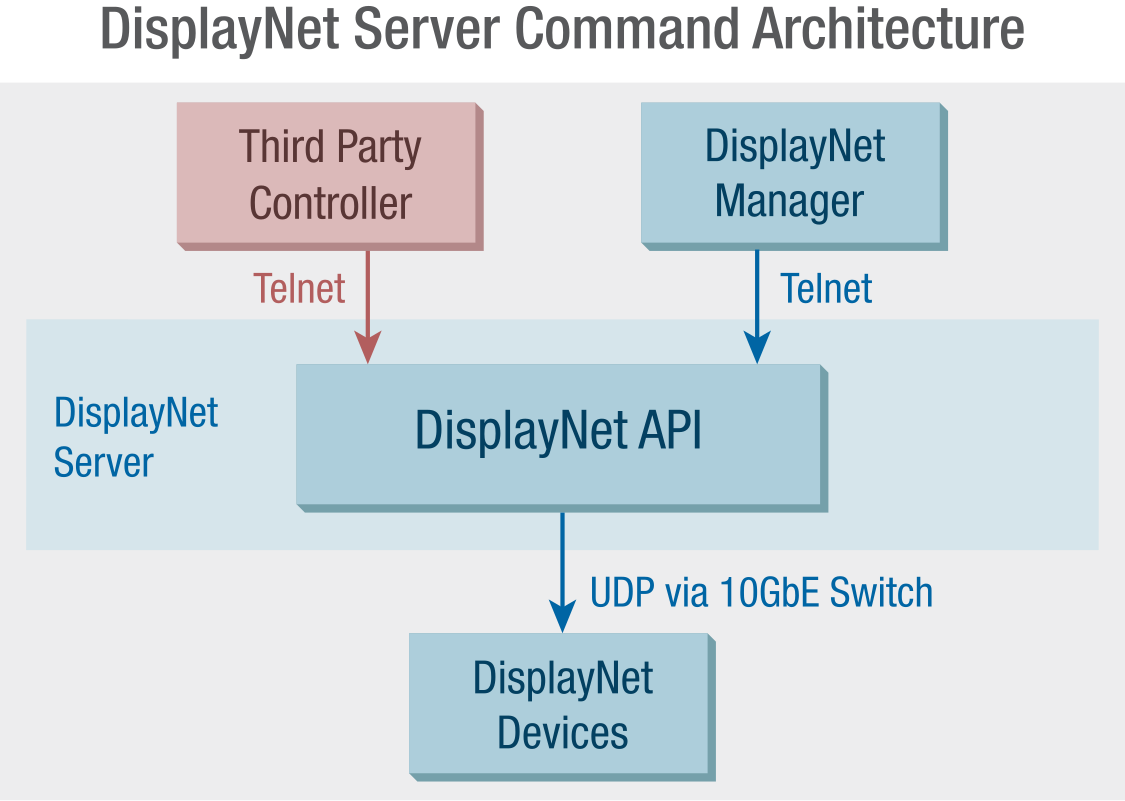
DisplayNet Manager includes tools to route signals, configure device settings, build wall configurations, perform EDID management, manage presets, and view DisplayNet API commands. Both the DisplayNet API and DisplayNet Manager are designed to facilitate the use of third-party control systems, enabling DisplayNet to be easily integrated into a wide range of professional AV applications and workflows.
Multiple control devices may communicate concurrently with a single server, and the server will manage these connections with sessions guaranteeing that each client has equal access to all devices and ensuring that all commands reach individual devices. If multiple commands are sent to the same endpoint simultaneously, they will be queued up by the server. Only a single DisplayNet Server should be actively used in a system at any given time. The DisplayNet API does not support multiple concurrent operating API Engines. If multiple servers were to communicate with endpoints simultaneously, only a single server's commands would be recognized and the resulting behavior is undefined.
Only a single DisplayNet Server should be actively used in a system at a given time. Please contact DVIGear technical support for full details.
An Uninterruptible Power Supply (UPS) is highly recommended for the DisplayNet server and should be considered to be an essential part of any system.